I’ve been playing WoW Forever since the beta, and one thing kept annoying me. Every time I wanted to know what a mob dropped, I had to alt-tab out, search a database, find the right mob, and then tab back in. Usually just in time to get pulled by a patrol.
I looked for a WoW addon to see all mob drops: one where I could hold a key, click a mob, and see everything it drops. I couldn’t find one that did it properly for Forever, so I made my own. It’s called Tnny’s Mob Loot, it’s completely free, and here’s how it works.
Quick answer: Tnny’s Mob Loot is a free WoW Forever addon that shows any mob’s full loot table in game. Hold Alt and click a mob to see every drop with its icon, rarity, and drop chance, or hold Alt and hover over it to see its top drops in the tooltip.
| Price | Free, no account needed |
|---|---|
| Game | WoW Forever (client 1.60.1) |
| Latest version | 1.7.0 |
| Drop data | Measured on Forever by Everloot, updated nightly, plus labelled Classic estimates |
| Settings | Type /tml in game |
| Last updated | 7 November 2026 |
Download free on CurseForge Free for WoW Forever · No account needed
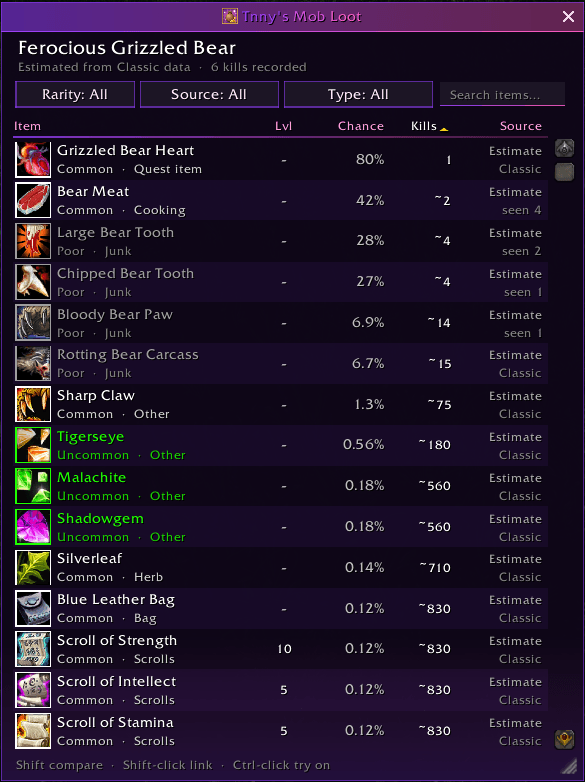
See what any mob drops with one click
Most loot addons I tried made me target the mob first, type a slash command, or dig through a separate browser window. I wanted it to be instant, so it works on whatever is in front of you:
- Hold Alt (you can change it to Ctrl or Shift).
- Click any mob: a boar, a rare elite, or a dungeon boss.
- A small window pops up with everything that mob can drop, sorted by drop chance.
Voila! The window also updates after each kill, so I leave it open while I farm. You can drag it anywhere and resize it, and it remembers where you put it.
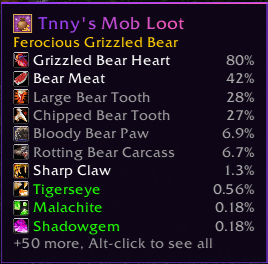
If you don’t fancy clicking, just hold Alt and hover over a mob instead. A short drops list appears beside the tooltip, inside it, at your cursor, in the middle of the screen, or wherever you drag it. You can sort that list by most likely, best quality, rarest, or most valuable drops.
What else it does
A loot table you can sort and filter
Click any column heading to sort by it: item, rarity, level, drop chance, kills, value, or source. Kills shows how many Forever kills a drop rate is based on, so you know how much to trust it. Value shows the vendor price you can expect per kill, which I find really handy for gold farming. You can also filter by rarity, item type, or source, or just search for an item by name.
Compare drops with your gear
Hold Shift while hovering an item in the loot window to compare it with what you’re wearing. I added this because I kept farming items that turned out to be worse than my current gear.
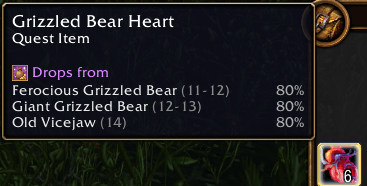
“Drops from” on every item tooltip
It works the other way round too. Hover any item, in your bags, in chat, or at the auction house, and the tooltip tells you which mobs drop it and how often. It’s the quickest way I’ve found to answer “where does this item drop?”
Two skins
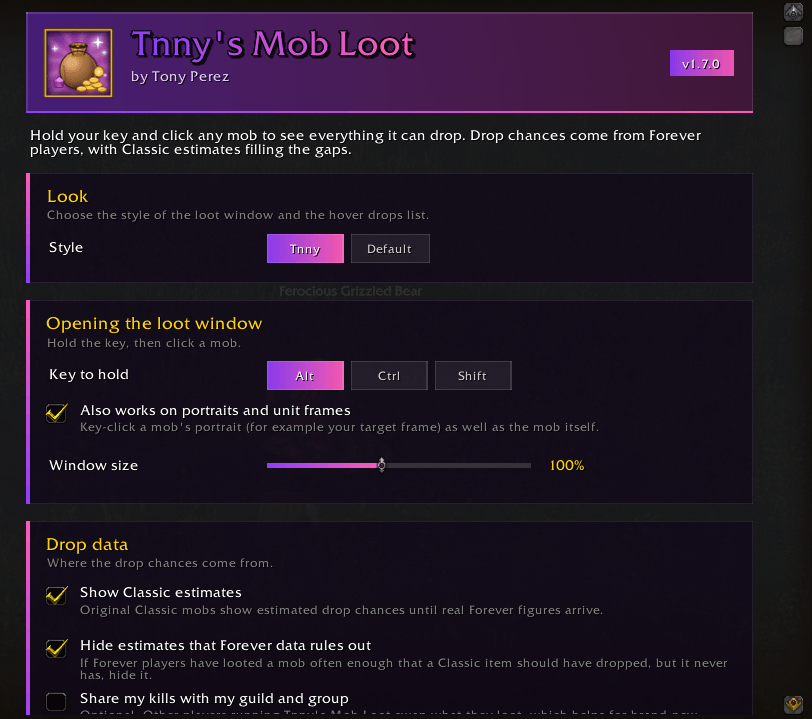
I made my own skin for it, called Tnny, with a clean purple and pink look. If you’d rather the addon blended in, switch to the Default skin, which matches Blizzard’s own interface.
Settings for everything
Type /tml to open the settings. You can choose your key and skin, where the hover list appears and how it’s sorted, the lowest rarity to show, which item types to hide, and how “Drops from” lists its mobs (best chance first, or mobs near your level first).
Where the drop rates come from
This is the bit I spent the most time on, and it’s what I think makes my addon different.
WoW Forever has changed a lot of loot since Classic, so Classic drop rates aren’t always right any more. Most loot addons I found either show Classic numbers, or only count your own kills, which means they start out empty. I didn’t like either option, so mine uses both and tells you which is which:
- Forever rates, measured by players. Drop rates come from Everloot, a community project that records real WoW Forever kills from lots of players. My server rebuilds the data every night, so the numbers keep getting better as more people play.
- Classic estimates, clearly labelled. Where Forever doesn’t have enough kills yet, the addon falls back to Classic estimates from the open-source CMaNGOS classic-db, and marks them as estimates.
- Out-of-date estimates hidden. If a mob has been killed enough times on Forever that a Classic drop should have turned up, and it never has, the addon hides it. That way you see what drops now, not what dropped in 2006. Quest items always show.
Want to see it for yourself? It takes about a minute to install.
How it compares to other WoW Forever loot addons
There are some great loot addons for Forever already, and they each do a slightly different job. Here’s how mine fits in, based on their CurseForge pages in November 2026:
| Addon | How you open it | Open-world mobs | Forever drop rates from day one |
|---|---|---|---|
| Tnny’s Mob Loot | Alt-click or hover the mob | Yes | Yes, from Everloot |
| Forever Guide | Search in its window | Yes | No, labelled Classic rates |
| Blackthornes Farmer | Its side panel | Yes | After 20 of your own kills |
| LootInsight Forever | Its tracking window | Yes | From your own kills, or guild sync |
| AtlasLoot | Dungeon and raid browser | No, bosses only | Varies |
If you mainly want a dungeon journal, AtlasLoot or Forever Guide will suit you. If you want to know what the mob in front of you drops, right now, that’s what I built Tnny’s Mob Loot for.
How to install it
With the CurseForge app (easiest):
- Open the CurseForge app and choose World of Warcraft.
- Select WoW Forever at the top.
- Search for Tnny’s Mob Loot and click Install.
Manually:
- Download the latest zip from CurseForge or from my download page.
- Extract the TnnysMobLoot folder into
World of Warcraft\_forever_\Interface\AddOns. - Restart the game, or type /reload if it’s already open.
You’ll get a welcome message in chat when it loads. Then just hold Alt and click a mob.
Frequently asked questions
Is there an addon to see mob drops in WoW Forever?
Yes, that’s exactly why I made Tnny’s Mob Loot. Hold Alt and click any mob to see its full loot table, with drop chances measured on WoW Forever. It’s free on CurseForge.
How do I see what a mob drops in WoW?
Without an addon, you have to look it up on a loot database website. With Tnny’s Mob Loot, hold Alt and click the mob, or hold Alt and hover over it to see its top drops in the tooltip.
Are the drop rates accurate for WoW Forever?
They’re measured from real WoW Forever kills recorded by Everloot and refreshed every night. Where there isn’t enough Forever data yet, the addon shows a Classic estimate and labels it, so you always know how reliable a number is.
Is this an AtlasLoot alternative for WoW Forever?
Not quite, as they do different jobs. AtlasLoot is a browser for dungeon and raid bosses, whereas mine works on any mob in the open world as well as bosses, straight from the mob itself. I use both.
Can I change the key from Alt?
Yes. Type /tml and choose Alt, Ctrl, or Shift.
Does it slow the game down?
No. The drop data is built into the addon and item details load in small batches, so tooltips stay smooth. I made a point of fixing any lag before release.
Is Tnny’s Mob Loot free?
Yes, completely free, with no account or sign-up needed.
Does WoW Forever allow addons?
Yes. WoW Forever supports addons, but not every Classic addon works on it, so always install the Forever version. In the CurseForge app, pick WoW Forever at the top before you search.
Where is the WoW Forever AddOns folder?
It’s inside your game folder at World of Warcraft\_forever_\Interface\AddOns. If the AddOns folder isn’t there yet, you can create it.
What’s new
Version 1.7.0 (November 2026): the latest release, with “Drops from” on item tooltips, the two skins, sortable columns, and the hover drops list. I’ll keep this section updated with every new version.
Give it a try
If, like me, you’re fed up with alt-tabbing to check loot tables, give it a go. Hopefully it saves you some time, and a few deaths to patrols.
Download free on CurseForge Free for WoW Forever · No account needed
This is the first WoW addon I’ve released, so if you find a bug or have an idea for a feature, please let me know in the comments below or on the CurseForge page. I read everything.
Drop data: Everloot contributors (CC BY-SA 4.0) and CMaNGOS classic-db (GPL-3.0). World of Warcraft is a trademark of Blizzard Entertainment. This addon is not affiliated with or endorsed by Blizzard.